Author: Rachelle Moore

  • Phixer’s Team Building Adventure: Kawasan Canyoneering Like a Boss

    Phixer’s Team Building Adventure: Kawasan Canyoneering Like a Boss

    Cebu is not only an island with long stretches of beach and clear water, but there is also an adventure waiting for you around every corner. Canyoneering in Kawasan is something that every adventurous soul should try at least once.

    This can also be an exciting activity that strengthens team bonds while making sure that each team member goes beyond the edge and tries something new.

    Kawasan Canyoneering

    To take the trip, you need to travel around three hours from the city to get to Badian, a town in the southern part of Cebu. Upon arriving, you will need to leave your stuff at your tour guide’s post.

    After you’ve secured your stuff, you will have to wear a life vest and a helmet as safety precautions during the entire trip. You also need to wear shoes for safety reasons. A motorcycle will take you uphill to the starting point. From there, you will do a little trek to get to the canyon and start the fun.

    A little bravery will go a long way once you’ve tried canyoneering. You don’t have to know how to swim in order to enjoy. This is what the life vest and the helmet are for. If you’re scared to jump, just don’t think and do it. Trust that your life vest will keep you afloat.

    The Activities

    Jumping off the cliff is the highlight of the entire trip. There are three points from where you could jump. The first one is around 20 feet high and is required. There are other two jump points that are optional. One is shorter while the other one is the highest point. Depending on how courageous you are, you can go jump from all three.

    Aside from jumping off the canyon, there are other activities that you can do during this trip. There will be a lot of hiking, rock scrambling, water sliding, rappelling, and swimming. The activities are fun and adventurous and perfect for the entire team. This creates a full day of exploration. The entire activity will last around six hours. After everything’s done, you can go freshen up at your starting point and change your clothes.

    The entire Phixer team pretty much had a long day at Badian. However, everyone had a blast. Every sweat and step is worth the adventure and fun that awaits. Going on a canyoneering adventure with the team definitely helps in bringing everyone closer creating a tight-knit family.

  • 6 Good Reasons Why You Should Hire Professional Real Estate Photo Editors

    6 Good Reasons Why You Should Hire Professional Real Estate Photo Editors

    Being in the real estate industry is competitive. The industry itself is extremely competitive with brokers and homeowners trying to outdo each other. Making a sale is always of the essence. When you have tough competition, your focus should always be closing deals. This is especially true for real estate photographers. Managing your time is important. Aside from spending days on taking photos, you need to edit and create the right images for the client. When you have other things to worry about, you cannot afford to spend precious time on tasks that you can delegate. This is where professional real estate photo editors come in.

    Outsourcing a part of your work to professionals will allow you to stay on top of your competitors, book clients faster, and produce output quicker.

    If you are still on the fence, here are the reasons why you need to hire professional real estate photo editors for your business.

    1. It saves you time.

    saves you time
    photo credit http://boscoanthony.com

    When you hire professional real estate photo editors to do the work for you, you save a lot of time. Instead of spending days editing tons of photos for a project, you are able to delegate it to professionals. Even if it’s just simple editing, the time you save is doubled or tripled. With this time, you can focus on the essential parts of your business or even on your personal errands. This can be an essential investment in achieving the necessary work-life balance. Doing so buys you time. In addition to that, delegating to professional editors also mean a quicker turnaround time for your output. Photos can be delivered the next day or in a few days without delay even while working on other projects. This could mean happier clients and you can move quickly to the next project.


    2. You can focus on the business.

    focus on business
    photo credit wsdm2013.org

    Assigning the editing task to professionals buys you extra time. With this, you can focus on the more important things and do what you’re good at. You don’t have to spend your precious time going over your photos, especially when professional editors can do that for you. Focus on your business instead and on booking more clients and projects. You don’t have to worry about dividing your time into various tasks. This lets you focus on the essential parts of the business, especially in networking and connecting with potential clients.


    3. This lessens your stress.

    stress free business
    photo credit huffingtonpost.com

    The extra time that you get will help in lessening the stress that you get when editing photos. Often, you work on images for hours to an end and the output doesn’t impress the clients. Once you let the professionals do the work for you, you save yourself from stressing out if the images are okay or not. You don’t have to re-do the photos if the clients don’t like it. Your editors will do all the work for you. So, you spend your time on more relaxing activities or on other parts of your business.


    4. Photos are enhanced the way you want.

    Photo Editing Company

    You don’t have to worry if the team can deliver the results that you want. Before handing the photos, you can specify your editing preferences and create a check-list of how you want the images to look like and how the client wants the images. Your professional real estate photo editors can use these settings and apply these to future batches. This creates a signature look and feel for all of your images.


    5. You can get fresh suggestions.

    photo by Tease Lifestyle Magazine

    Having fresh eyes work on your images will drastically change your output for the better.  Through professional photo editors, you can receive an unbiased perspective of your work. They can provide you with suggestions for improving your photos. This also improves the quality of your output while improving the turnaround time and efficiency of the work. These professional editors are experts in their field so they can use these techniques to make your photos even better. There are times when you may not be aware of these techniques.


    6. It helps you generate more sales.

    photo credit to the owner

    With the amount of time that you save and the quality of output that your professional editors produce, you can be assured of the influx of projects that you will get. You can spend more time on shooting projects and in dealing with clients instead of facing the computer editing your images. You can close bigger and better deals with this combination. This also means more income for your business.

    These are just six among the many reasons why you should consider getting professional real estate photo editors for your business. Outsourcing the editing task of your business is a much-needed investment, especially if you’re looking into expanding. This will not only help you to book more clients but will also improve the bottom-line of your business.

  • Topnotch Realtors Reveal Their Favorite Real Estate Photographer

    Topnotch Realtors Reveal Their Favorite Real Estate Photographer

    In shooting real estate, the important task is to keep or improve the property’s value by prepping it properly. This is your responsibility as a photographer. However, you also have to follow the taste and preference of the agent or the homeowner and meet their marketing goals. Remove objects that will devalue the property and think of how you can beautify it with every shot.

    Q&A Interview with US Topnotch Realtors (in random order):


    realtors-favorite-real-estate-photographer Elliott Donovan


    Realtors: Elysia Casaday and Brittany Allison | http://www.CasadayAllison.com
    Phone No. & Email: CasadayAllison@Wydlerbrothers.com or 301-787-4147
    Question: Who is your favorite real estate photographer and why?
    Answer: Elliott Donovan
    Photographer’s website: http://www.homevisit.com/ or http://www.elliottodonovan.com/


    realtors-favorite-real-estate-photographer ​Linen & Lense​

    Realtor: Jason Townsend | http://capitalcommunityproperties.com
    Phone No.: 202-415-7400
    Question: Who is your favorite real estate photographer and why?
    Answer: We love our real estate photographer because they are reliable, consistent, & superior! The quality of work is top-notch & we can be confident regardless of weather or type of home, the photos are going to present our listing in its very best light while underscoring every strength. Their photos allow prospective buyers to see themselves in the home and cultivate irrational exuberance which is an invaluable skill. In the age of the internet, photos are your lifeline in real estate- our photographer understands this and has been a key part of our listing growth and success.
    Photographer’s Name: Linen & Lense
    Photographer’s Website: http://www.linenandlens.com/


    realtors-favorite-real-estate-photographer Magin Urdanick

    Realtor: Casey Aboulafia | www.homeswithcasey.com
    Phone No.: 202-780-5885
    Question: Who is your favorite real estate photographer and why?
    Answer: My favorite photographer is Magin Urdanick. Besides being friendly and great to work with as a person in general, her skills and “eye” for photos are really great. Not merely ‘room’ shots, she takes some wonderfully artistic shots that set the tone and feeling of connection for potential buyers looking online. It really bumps up the draw to get buyers into the house, and the sellers love her shots.
    Photographer’s Website: www.exposurere.com


    realtors-favorite-real-estate-photographer Steve Hanson

    Realtor: David Marks | www.davidkmarksre.com
    Email: david@davidkmarksre.com
    Question: Who is your favorite real estate photographer and why?
    Answer: Steve Hanson….good quality work, prompt turnaround and open to suggestions based on the type of marketing material I want produced.
    Photographer’s Website: http://www.hansonphotogroup.com/


    realtors-favorite-real-estate-photographer Jenny Jenkins

    Realtor: Heather Dolin | www.heatherdolin.com
    Email: hdolin@windermere.com
    Question: Who is your favorite real estate photographer and why?
    Answer: Jenny Jenkins with Vicaso. She has a gift in capturing the space; both in size and feel. She’s also great about making slight adjustments to the room to maximize the photo.
    Photographer’s Website: www.vicaso.com


    realtors-favorite-real-estate-photographer Rancho Photos in Southern California

    Realtor: Fred Sed | FredSedRealty.com
    Question: Who is your favorite real estate photographer and why?
    Answer: We love to work with Rancho Photos in Southern California for all of our listing photos. Not only do they do a great job, but their photos are very elegant as is evidenced by their website design and extensive portfolio giving us confidence that we will give our clients the quality they expect. They have a very fast turnaround time with a large team of highly qualified photographers. Within less than a week, we can order photos, have them shot, edited, and sent back to us in multiple formats and complete the payment through their website making our job quick, easy, and seamless.
    Photographer’s Website: https://ranchophotos.com

  • Top 5 Social Media Channels for Real Estate Photographers

    Top 5 Social Media Channels for Real Estate Photographers

    As a photographer, networking is a skill that you need to master. This is one of the effective ways to connect to more potential clients while establishing your name as a photographer. This is even more important for real estate photographers who rely on business owners, brokers, and homeowners for projects.

    Aside from traditional networking, the different social media platforms online are serving as great avenues for networking and connecting with people. Real estate photographers can use these as an avenue.

    Facebook

    Facebook is still the number one social media platform to reach more people. It is the most popular social network today across all demographics, especially for those in their 50s and beyond. There are two billion users worldwide and it is the platform where people spend most of their time on.

    If you have a personal Facebook account, create a designated Facebook page for your business. This will allow you to set up a profile that is separate from your personal profile. You can showcase your work, projects, and setup a messaging avenue with your page. This also lets you customize it with events or stories. Make sure that you build a solid and consistent branding on your Facebook page. Try to not post personal stuff on your page and curate its content.

    With a Facebook page, you can also advertise and reach more potential clients. Create effective sales funnel or promote your website through Facebook.

    To start your own page, just go to facebook.com/pages/create. Choose the right category and a more specific category option from the drop-down menu. Fill out the required information and get started. Make sure that you create the right profile by identifying your field of work, location, contact details, and testimonials.

    Instagram

    Instagram is an image-based social media platform that works well for photographers. This can be a great tool to promote your work without overselling yourself. Remember, don’t put everything from your portfolio. You can use Instagram to curate your best photos while also sharing bits about your profession and life. Add some behind-the-scenes shots from projects to show a more human side to your business. Be curt with your profile and use the right hashtags on your photos.

    If you’re still not on Instagram, just download the mobile app on your smartphone and sign up with your email. Then, start creating your account. Post photos regularly and make sure you connect and engage with your followers and other people in the real estate field.

    Twitter

    Having a Twitter account is a great tool for connecting with business and influencers. Twitter is very different from other social platforms since you are restricted to 140 characters. This brevity makes it appealing to millions of its users.

    Use Twitter to promote your content and to market your work. Link up your blog post or post photos from your recent projects. Follow other photographers and real estate agents in your area. Connect and network with people from your industry. Remember that Twitter is all about community, so connect, tweet, and retweet content.

    To create a Twitter account, just go to the website and enter your full name, phone number, and password. Sign up for Twitter and verify your account. Then, you can start filling out personal information and adding photos to finish up your Twitter account. Download a Twitter app on your phone so you can easily send tweets.

    Pinterest

    Although this social platform is used by mostly women who look for crafting or fashion inspiration, Pinterest can be used for businesses as well.

    The best way to use Pinterest is to promote your work. Link up your website through your stunning images. Make sure that you create appropriate boards that connect to your work, such as home design, interior, or even photography. Describe each of your pins and ensure that your photos are all watermarked. A testimonial board will also work for you. You can do all these to promote your services while also increasing traffic to your site.

    Go to Pinterest’s website or download the mobile app to create your account. Just input the necessary details and you’re ready to go.

    Flickr

    This platform is used by many photographers all over the world. Whether you are a professional photographer or a hobbyist, there’s a place for you on Flickr. Created by Yahoo!, Flickr can be used a sort of portfolio for your work. It’s a great tool for organizing and sharing your photos. You can link to your photos for your website or blog and categorize it accordingly.

    You can also join relevant groups that are made for specific interests. There are groups for real estate photographers or for photographers with Canon, Nikon, or Fujifilm cameras. Joining groups allows you to network with other photographers or real estate brokers.

    To create a Flickr account, just go to the website and sign up. Fill out the needed information and you can now start uploading your photos.

  • Real Estate Image Editing Tutorial for a Newbie Photographer

    Real Estate Image Editing Tutorial for a Newbie Photographer

    As a newbie real estate photographer, there are more tasks that come after booking your first project. Once you’ve wrapped up your shoot, the real job is just starting. Your goal is to deliver the images as the client wants them. These photos should represent the real estate property accurately and make it appealing to prospective buyers.

    In order to achieve this, you need to do post-production editing to improve your images. This will make your photos clearer and have better colors and lighting, depending on the scene. Unlike shooting portraits or events, editing for real estate is a different thing.

    The needed software

    Having the necessary software is essential to editing your real estate images properly. As a newbie photographer, you need to be familiar with both Adobe Photoshop and Lightroom. These two are the most useful and the most common editing software for all types of photography. Especially for real estate photography, these two are a must.
    Aside from these, the Enfuse plugin on the Lightroom is also important for HDR photography. If you’re shooting a lot of interior for your projects, then knowing how to HRD will be indispensable.

    The step-by-step process

    In editing your real estate photos, follow these steps:

    real estate photo step guide

    1. Before working on your images, you need to import all of your photos to you desktop and to your Lightroom catalog.

    2. Once you have imported your photos, you can start working on them. If you have bracketed shots that you’ve taken for HDR, then it’s time to create a single stack for them. You might have three to seven photos on a stack depending on how many exposures you have taken.

    3. Adjust the color temperature on each of your stack using the eye dropper tool. This ensures that each of your bracketed stack has the same color temperature.

    4. Blend your bracketed photos through your Enfuse plugin. Highlight your stacks and trigger the Enfuse process. This lets Enfuse blend each stack individually.

    5. After successfully blending the stacks, edit the photos in Lightroom. Adjust the exposure, highlights, shadows and other necessary elements of your photos.

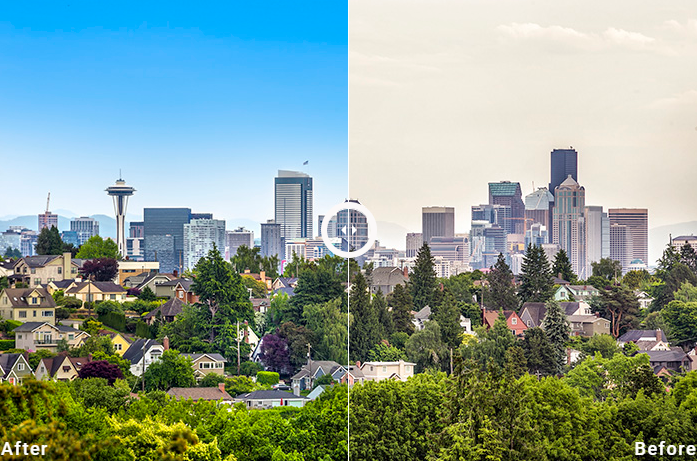
    6. If you have exterior photos of the property that needs more difficult editing processes, then you might need to use Photoshop. This is usually used for sky replacements or removing objects.

    7. Then, you might want to use some presets and adjust the photos accordingly so they have a similar look and feel as the client would want.

    8. Once you’ve finished all the necessary edits and you’re quite happy with the results, it’s time to export the photos and package them for delivery.

    Some tips and tricks

    Aside from the basic editing, there are other factors and tips that you have to keep in mind while going through your images. Here are some tips to remember:

    If you are shooting interior with a wide lens, having a sort of line convergence usually cannot be avoided. So, you have to straighten out the lines through your Lightroom’s Lens Correction option under the manual section.

    Remember to even out the light during post-production. Lighting is key for every type of photography most especially for real estate photography. This is probably the first thing that you have to check. The goal is to make the image and lighting look natural. To do so, push the exposure slowly so you get a feel if it’s too bright or not.

    Cleaning up your images is a must before you hand in the final photos to the client. Do spot removal or cloning if necessary. The spot brush tool removes dust or spots that are in the photo. Clone allows you to remove any reflections or glares. Healing, on the other hand, corrects smaller spots but adds a softer blend to the spots.

  • Phixer’s Team Building Adventure: Cebu’s Top Three Islands

    Phixer’s Team Building Adventure: Cebu’s Top Three Islands

    The Philippines, being an archipelago, has so many islands to visit and to explore. Cebu is one of the major islands in the Visayas and is dubbed as the gateway to the south. Cebu alone is composed of different islands. What do you get with this? Endless beach and tons of fun under the sun.

    Island Hopping in Cebu

    There are many small islands that you can visit and check out in Cebu. Going on an island hopping tour is one of the top things that tourists and even locals should do to unwind and relax.

    With a small boat, you can tour and visit different islands off the coast of Mactan. The top three islands to visit are Olango Island, Nalusuan Island, and Caohagan Island. Phixer’s team picked out these three islands.

    Olango Island has a bird sanctuary that’s worth checking out. Although the island doesn’t have white sand beaches, it makes up for the rich resources. You can go kayaking or check out the bird sanctuary.Nalusuan is a protected marine sanctuary. The island is filled with marine life and you don’t have to go deep down the water just to see the fishes. It’s truly a wonderful place to appreciate marine life. Lastly, Caohagan is another marine sanctuary with crystal clear waters and teeming with marine life. It’s perfect for snorkeling and swimming when the water is just right.

    Activities when Island Hopping

    On an island hopping tour, you’d never want your day to end. There are tons of activities that you can do, especially when you’re out there building stronger bonds with your team and co-workers.

    • Karaoke on the boat. Singing is an all-time favorite Filipino pastime. Karaoke on the boat is probably the best thing that you can do while boating. Being in the middle of the sea while singing your favorite tunes is nothing short of fun and relaxing. You can make it a friendly competition among friends on who gets the highest score.

    • Snorkeling. The islands in Cebu boasts of amazing marine life. You cannot go boating in Cebu without snorkeling and checking out the life underwater, especially when you’re going to these marine sanctuaries.

    • Lunch on the boat. Imagine having the simplest food yet having the best time on the boat. Sharing good food with the best people is always a great idea. Even the simplest food can become a feast when you’re in the company of friends.

    • Swimming. You cannot go boating without going for a swim. The seas in Cebu are clean and clear so it’s perfect for dipping. The boat can stay out in the sea while the rest of the team goes swimming.

  • How to Find the Best Real Estate Photo Editing Company

    How to Find the Best Real Estate Photo Editing Company

    High-quality images are needed by all types of business, most especially in the real estate industry. Photos are effective tools in selling, no matter what the product is. Whether you’re a realtor or a real estate photographer, ensuring that photos wow your potential clients is your number one priority.

    This is why you need to invest in amazing photo editing. Aside from making sure that you get a professional photographer to take photos of the property, having a great team of photo editors will ensure that you have high-quality images. Photo retouching is serious and it can make or break your business.

    Where to look for a trusted real estate photo editing company

    There are already a lot of image editing solutions companies around the globe. There are a ton of options depending on the type of retouching that you need to be done. If you’re looking for a real estate photo editing company, use the following resources to hire one:

    • Search online. Many photo editing companies are usually located in different countries. Although the headquarters and main offices are in the US, the services are outsourced to trained professionals abroad. Just search for real estate photo editing companies and the companies will pop up in your search. Look into their sites and check if they are credible enough to work with.

    • Ask friends for recommendations. If you have friends who have recently worked with photo editing companies, you can ask them for recommendations. This is an easier way to get options from people that you trust. Make sure that they have positive feedback for these companies, as well.

    If you have a few companies on your list, narrow down your choices to five or fewer companies. Make sure that you go for those that are professional and have been working in the industry. Having a few choices will ensure that you hire the best one.

    Factors to consider in hiring a photo editing company

    Once you’ve found a company, you have to scrutinize it in order to find a reliable one that produces high-quality images. It’s not enough to hire the first one that you happen to stumble upon.

    Here are the factors that you need to consider before you hire a photo editing company to do the work for you.

    • Experience. The company needs to have a good amount of experience in the real estate industry. Look into how many years they have been in business. Go for those that have been around for 10 years or more. This ensures that they have dealt with different images and properties. Those with a wide experience can provide you with professional editing and images.

    • Technical knowledge and technological expertise. Verify if they use the newest technology and programs for the job. Usually, just having updated technical knowledge will improve the output of the team. Having the right software affects how efficient and effective the company is. They should be able to retouch the most challenging photos and produce the best images.

    • Customer feedback. Make sure that you check the reviews left by their previous clients. This gives you the assurance that they always leave their customers feeling satisfied with the output and that they are professional with the work that they do. Check if they have negative feedback and unsatisfied customers. This is a red flag when it comes to outsourcing your retouching work.

    • Portfolio. Ask for the company’s portfolio, especially for real estate images that they have worked on. Make sure that they can provide you with a recent portfolio of relevant images that work for your industry. Check if the quality of work that they do is at par with your brand. This will help you make your decision and check if you can get a consistent look in all your photos.

    • Turnaround time. Different companies have a different turnaround time for the certain volume of photos. You need to specify the work you require and ask for their expected turnaround time. There will be times when the set time will increase depending if it’s peak season or not. It’s best to go for those who can be flexible and fast with their turnaround time as speed is essential to the business, especially when it comes to keeping up with the competition.

    • Pricing. Some companies already specify their pricing depending on the services that they offer. There are those that charge an hourly rate while others go per image or per project. There will also be an additional charge for rush retouching. This is something that you have to tell the company, especially if you need the images right away.

    • Support team. Having a local support team can make a great deal of difference if you’re encountering issues with the output. A communicative team will not leave any of your questions unanswered. You are able to discuss queries and openly discuss ideas.

  • Top 6 Coolest HDR Software Programs

    Top 6 Coolest HDR Software Programs

    HDR (high dynamic range) is a staple when it comes to real estate photography. It is an old photography technique that requires you to capture a wide range of light stops from lightest to darkest and then combine all those images. This creates a wider dynamic range than a photo with a single exposure.

    Although cameras and smartphones already carry the HDR feature, this might not be effective for professional real estate photography. The usual issue with this kind of system is that you have no control over the output. The best solution is to use your DSLR and shoot with RAW while using the auto exposure bracketing. Once you have the images with the different exposures, you can edit them to create the desired result.

    [lwptoc]


    HDR Software Options

    There are different HDR software options that you can use in order to create the perfect image that you need for real estate. Different real estate photographers have different preferences.

    Here are the top six HDR software programs that photographers use:

    1. Photomatix Pro

    This software is the top HDR programs for many photographers. Photomatix is developed by HDRSoft and is one of the oldest around.The great thing about the Photomatix is there are four tone mapping methods that can be used to make creative looks. Photomatix is a great all around HDR software and that is not just limited to real estate photography use. When you used right, you get the most amazing photos.

    2. Aurora HDR

    This is another HDR software that many professional photographers swear by. Developed by StuckinCustoms and MacPhun, this only works for Mac users. This is one of the easiest HDR software platforms out in the market today. It has a ton of different features that can be used to create different looks for your images. It’s close to being an all-in-one software that it has its own spot healing brush. Its HDR Tone Mapping feature is powerful and one of the best among all the software options.

    3. Nik’s HDR Efex Pro

    The company has always been at the forefront of producing presets and filters for Photoshop. With the HDR Efex Pro, the software is created to act like a plugin to your photo editing software. This software is great for people who don’t want to move back and forth across different software. The HDR Efex Pro creates a different workflow than that of the usual HDR software.

    4. Adobe HDR Photo Merge in Lightroom

    If you are using Photoshop or Lightroom, you need not look further. Lightroom has its own HDR Photo Merge that lets you combine images to create an HDR photo. This extra feature has different blending options, like Auto Tone and Auto Align. Auto Tone is used for merging photos while Auto Align is used for aligning your images.

    5. Easy HDR

    This software was released in 2006 and has gone through different versions through the years. This software is also user-friendly and one of the best in the market. It’s quick and can be easily installed. Unfortunately, this software doesn’t handle RAW files quite well. Older CR2 files might need to be exported to Lightroom first in order to create better images. To get the best results with this program, try converting your images to 16-bit TIF files.

    6. HDR Projects 4

    This is one of the newer software options in the market and it’s packed with some interesting features. It’s available on both MAC and Windows and it’s easy to use. HDR Projects 4 comes with a Lightroom plugin that makes the workflow easier. Unfortunately, its presets aren’t that outstanding. But it has quite a lot of controls and options. This software can be promising when used the right way.

  • The 15 Best Laptops for Photoshop Compared

    The 15 Best Laptops for Photoshop Compared

    When it comes to Photoshop, a powerful computer setup is a must. There are specific technical requirements to run this program and since one has to be mobile most often than not, a laptop is a popular choice. You need to consider the specifications of your laptop to see if its performance meets the demands of Photoshop.

    [lwptoc]

    If you’re in the market for a laptop, here are the top 15 best laptops for Photoshop that you should check out:

    1. Apple MacBook Pro MJLQ2LL/A 15” with Retina Display

    Apple is known to produce the best laptops for photo editing and Photoshop. This laptop comes with a 2.2 GHz i7 processor but can be overclocked to 16GB RAM for a faster performance. Unfortunately, its 256 GB of SSD storage might not be enough to store all of your RAW files. You have to get an extra backup for all your files. Despite the storage issue, the main highlight of this laptop is its retina display.

    2. Apple MacBook Pro 15.4” 1TB Touch Bar Silver

    This laptop has a 2.9 GHz i7 processor. Its 15.4” retina display is best for editing raw files in high-resolution. It has a 16GB RAM with 1TB SSD drive. The touch bar on this MacBook Pro is innovative. It can input commands without you having to memorize the keyboard shortcuts. Its Touch ID sensor improves the access to the laptop. This is probably one of the best laptops out there for Photoshop use.

    3. Asus M580VD-EB76 VivoBook15.6” FHD

    This Asus laptop is powered with an i7 processor, NVIDIA GeForce GTX 1050 4GB graphics card and a 1TB HDD. It has an internal memory of 16GB DDR4. It has a full HD resolution and supports 100% the sRGB color.

    4. Asus F556UA-AB54 NB Laptop

    This is a Windows laptop that has a 2.5 GHz Core i5 processor that’s great for photo and video editing. It has a memory of 8GB DDR4 and a built-in 256GB SSD hard drive. The great thing about this laptop is that it comes with multiple USB slots that are compatible with most devices.

    5. Lenovo 17.3” ThinkPad P71 Mobile Workstation

    It has a 3.1 GHz Intel Xeon E3-1535 M processor. Its large 17.3” display gives you three times the screen resolution as compared to the most common full HD laptops. The laptop has an internal memory of 16GB and an NVIDIA Quadro P4000M 8GB graphics card. Unfortunately, its storage is a bit small with the only 512GB worth of space.

    6. Lenovo ThinkPad P50 Mobile Workstation

    One of the major advantages of this laptop is its 4TB SSD storage. It has a powerful Intel Core i7 processor with 8GB RAM. Its graphic has a 4GB internal memory for smooth operation.

    7. Lenovo 15.6” Legion Y520 Notebook

    This laptop has a good combination of speed, affordability, and performance. It is powered by a 2.8 GHz Intel Core i7 processor. It has an internal memory of 8GB. This has 1TB of traditional HDD and a 128GB SSD. It has an NVIDIA GeForce GTX 1050 Ti Graphics Card.

    8. Dell 15.6” Precision M5510 Multi-Touch Mobile Workstation

    It comes with a 2.7 GHz Intel Core i7 processor and a 8GB internal memory. It has a sharp display with a resolution of 3840 x 2160 pixels. Having a dedicated graphics processor, like what this laptop has, creates a smoother performance.

    9. Dell Inspiron 15.6” Full HD Gaming Laptop

    This laptop is designed for a photographer who uses Photoshop a lot. It has a 7th generation i7 processor and an internal memory of 8GB and 1TB storage. You can also overclock the memory of the laptop up to 32GB. Its secondary 128GB SSD storage allows your system to work quickly.

    10. Dell Gaming Inspiron 17.3” FHD Laptop

    It has a full HD display that’s backlit and anti-glare so you can work even under the bright light. This laptop is powered by an Intel Core i7 processor and a 16GB RAM memory. It has a storage of 2TB HDD which gives you ample of space to save your work. This has an AMD Radeon R7 M445 graphics card that has a 4GB memory for a powerful laptop.

    11. HP 15.6” Zbook 15 G3 Mobile Workstation

    It has an Intel Xeon E3 processor and an internal memory of 16GB. It has four memory slots that you can fill up so you can have a more powerful laptop. It has a 15.6” full HD display with a resolution of 1920 x 1080. It powerful NVIDIA Quadro M2000 graphics card with a 4GB memory.

    12. HP ENVY TouchSmart 15.6” Touch-Screen Laptop

    This laptop proves that you don’t have to spend a lot for an efficient one. It is powered by an Intel Core i5 processor and a 8GB RAM. Although it doesn’t have a dedicated graphics card, it has an Intel HD Graphics 4600 that’s enough for editing projects.

    13. MSI WT72 2OL-1246 17.3”

    It’s powered by an Intel Core i7 processor with 16GB RAM. It also has an NVIDIA Quadro K4100M graphics card. The laptop has a full HD display with 1920 x 1080 resolution. Its large screen allows you to have a pretty good view of your work. Although it doesn’t have a large enough resolution, its screen size makes up for it.

    14. MSI GE72 APACHE-235 17.3” Gaming Laptop

    Its large screen makes it a good laptop for editing projects. It has an Intel Core i7 processor and an NVIDIA GeForce GTX960M graphics card that has 2GB memory. The laptop has 16GB dedicated memory and 1024GB HDD. Although it doesn’t have an SSD, it’s still fast enough for Photoshop.

    15. Acer Touch V3-372T Ultrabook

    This is a mid-range laptop that has an ultra-thin design. It is built with an Intel Core i7 processor that’s powerful enough to handle photo editing tasks. It has a 13.3” display that’s in full HD. The laptop comes with an 8GB DDR3 memory that can be expanded to 16GB. It has a 512GB of SSD for storing your work, but might not be enough to handle all of your RAW files.