Category: Real Estate Photo Editing

  • 4 Advance Photo Editing Techniques You Need To Know

    4 Advance Photo Editing Techniques You Need To Know

    A good real estate photo is a sum of various techniques in photography and post processing. While a beautiful property will definitely help, its success depends on the agent and what happens in front & behind the photographer’s lenses.  We have established the intricate processes every photo goes through to make it flawless, here we dish on 4  advance photo editing techniques to step up your career in real estate photography.

    Blending Layers

    When taking photos of a project, make sure to take an ample number to be able to make a composite. Composites are usually useful for interior shots, and what a professional photographer would do is to take varying flash shots of a room then blend it. Adobe Lightroom is a great tool that can help in blending layers. However, if you want to the colors to be more precise, it’s best to blend flash layers and fuse layers in Photoshop. To start, open all your images and make sure to include both ambient and flash photos. Ensure that all layers or layer sets that you want to merge are visible, then merge.
    Removing Hard Shadows

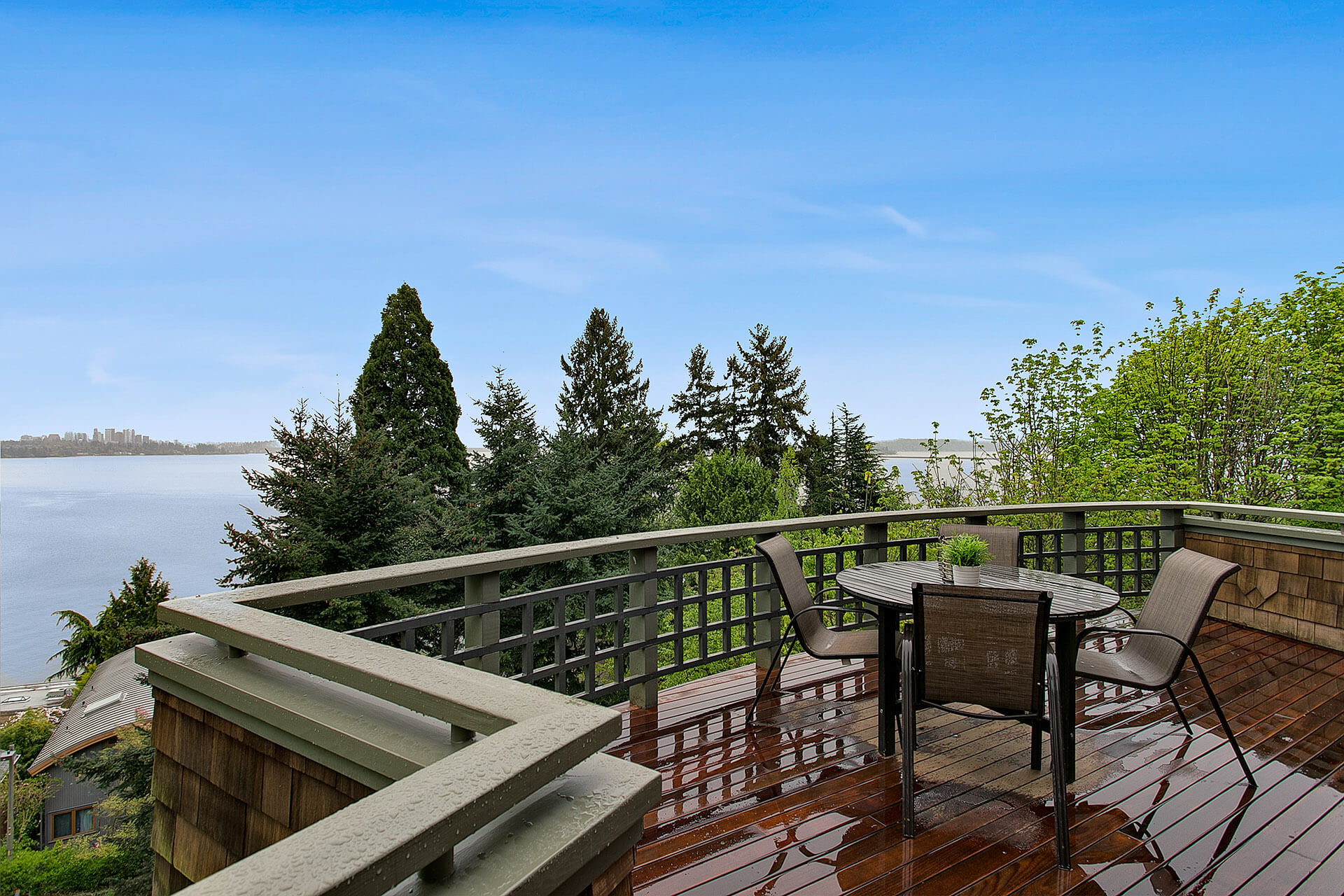
    If you don’t want to look like an amateur, it’s important to keep your photos looking neat and sharp. Thus, a hard shadow is unacceptable and should be removed. You can reduce shadows in two steps; first, you layer masks and second make use of your brush tool.

    In fact, brush tool is your new best friend. Set brush to 0% Hardness & 100% Opacity. If you want more control, you can lower the opacity. After setting up your brush, smoothen out the shadows.

    Color Replacement

    Even with the best lighting possible, sometimes raw photos don’t have the best color. The worst thing really is to have a flat-looking photo, other than manipulating hues and saturation, it’s a great advantage if you know how to use the color replacement brush. This technique is also useful in balancing out colors as well as correct color of your photo.

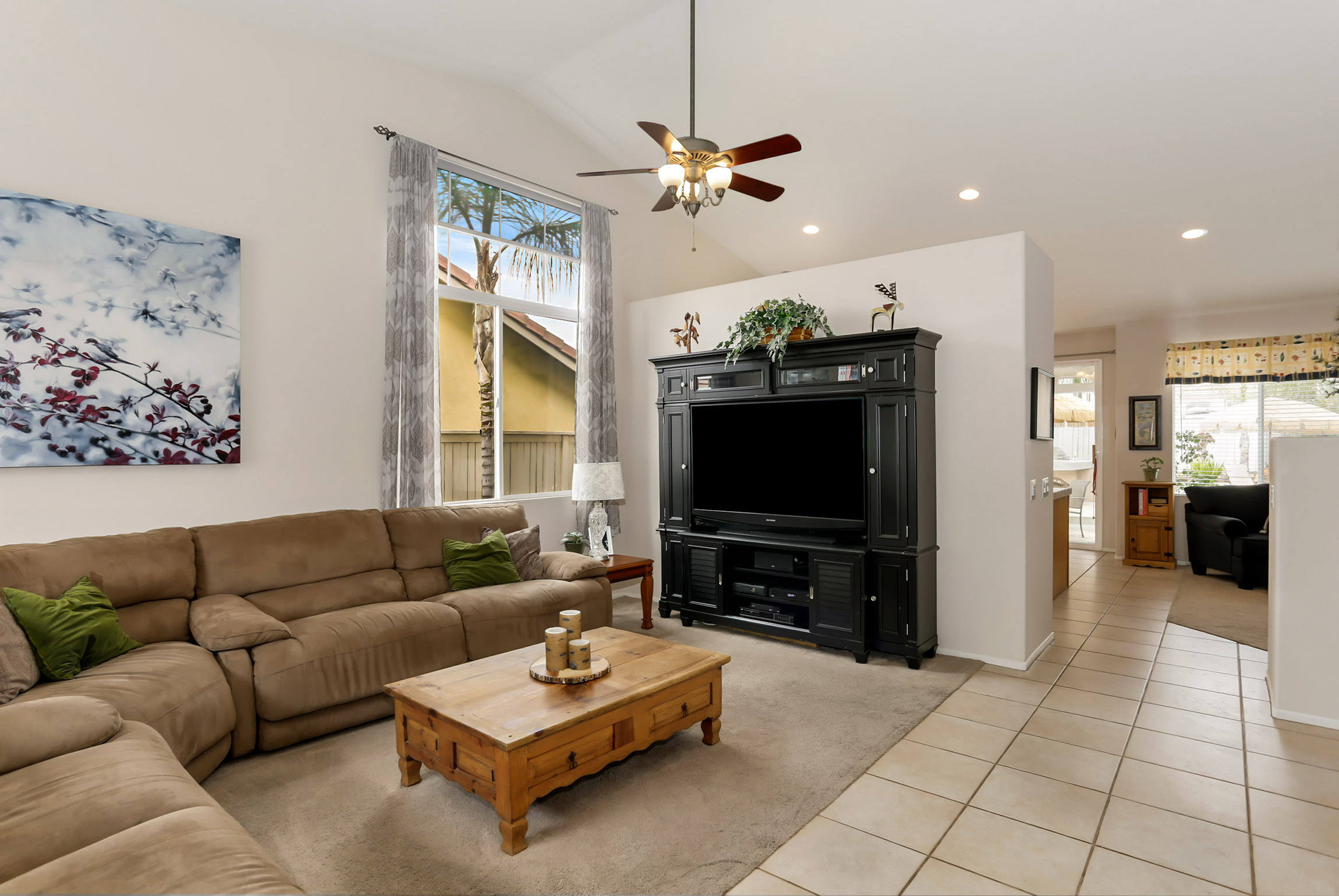
    In the photo above, notice how the wall color is slightly different than the original, replacing the color will remove any imbalances caused by for example window reflections or glare.  To select the color replacement tool, go to the regular brush tool, right click, then choose the color replacement tool from the fly-out menu.

    When choosing a replacement color, however, make sure to pick the nearest possible color from the original.


    Window Pool

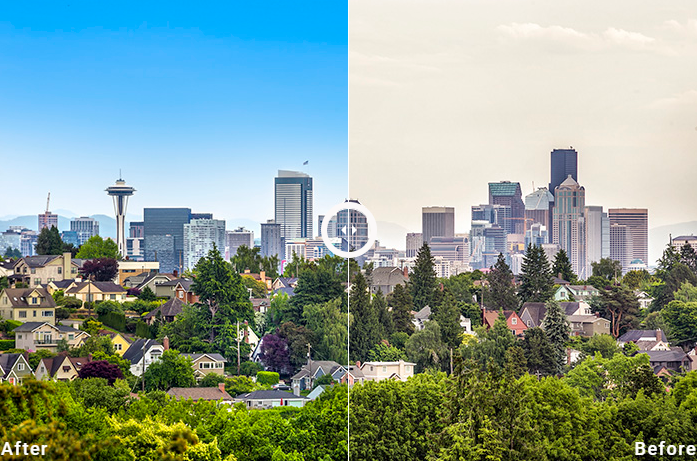
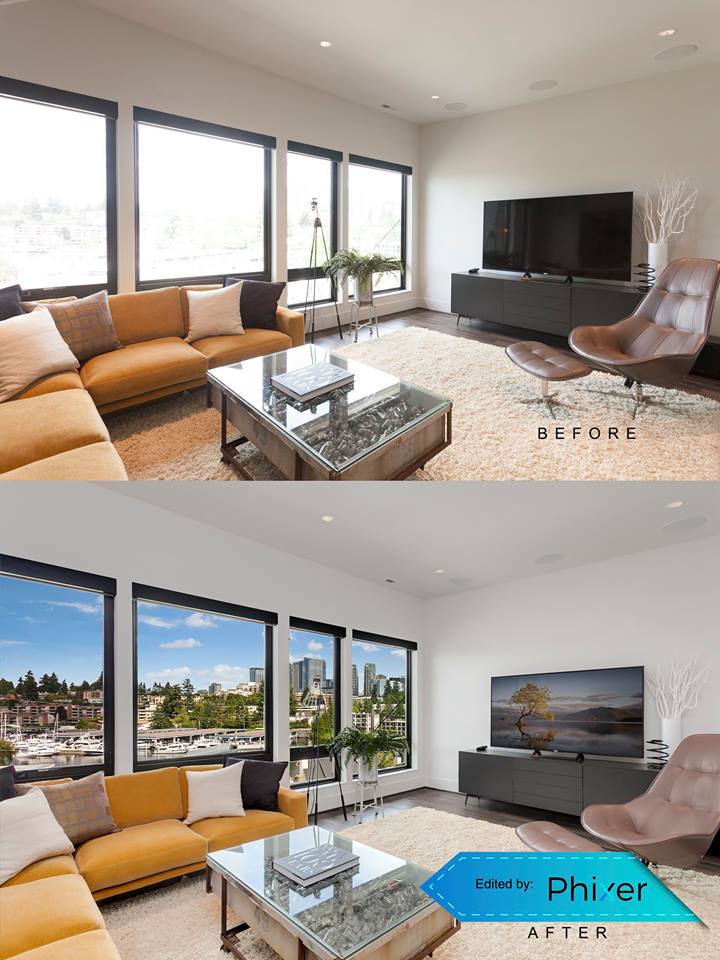
    To get the most of your interior photo, it is important to check any exterior that can be seen from the inside. For example, in the photo above colors outside the window appear to be dull. To fix this, look for the lasso tool found in adobe photoshop and start cutting out the areas to be able to edit this specific area (see photo below) then adjust colors accordingly.


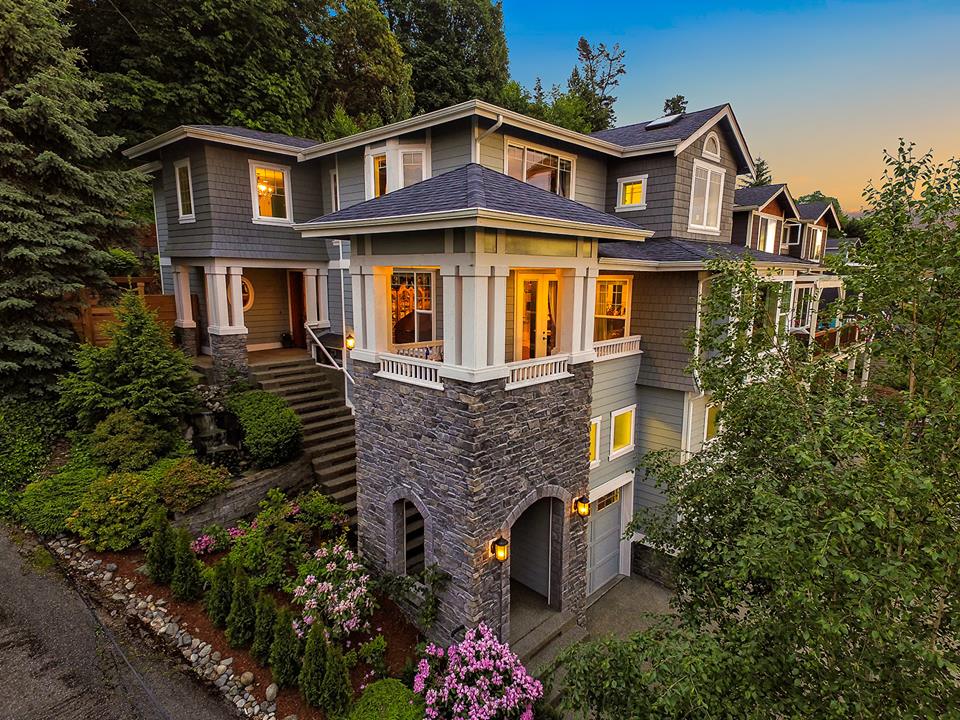
    There you have it! Photo editing really takes time and effort. If you don’t have ample time to post process your real estate photos, there are companies that offer photo editing services with the most sophisticated tools you can think of. Check out our final photo after applying the 4 techniques mentioned above!

  • How to Edit Basic Real Estate Photos Using Adobe Photoshop CC?

    How to Edit Basic Real Estate Photos Using Adobe Photoshop CC?

    Photo editing can recreate ordinary pictures to look extra amazing. Enjoining your family on a trip to a splendid vacation, attending parties with your friends or possessing great memories of special occasions, taking pictures from these events can eventually make the event more extraordinary.

    In these times of digitization and information age, almost everything we think of can be completed at the tip of the fingers. Picture editing is one of the most common tasks to be done when it comes to enhancement of pictures. Old images, photos and videos are the ones which are preferred to be edited. Image restoration of these types of pictures ultimately needs a particular set of skill.

    With proper knowledge on photo editing, it can be guaranteed that profits can grow exponentially when used in a correct and professional manner. Photo editing is valuable to portraits for personal representation of pictures. It can be utilized for special occasions like birthdays, anniversaries, weddings and other eventful ceremonies. It is also suitable for commercial projects and businesses, like real estate, in particular.

    Photo editing can also help service and advertising firms for real estate companies and brokerage systems. It can increase the aesthetic beauty of properties by the enhancement and enrichment of images. Images are edited by making the color more vibrant and to make the photos look more entertaining to stare at. These modified images may turn out to be used for listing services for other websites.

    Some of the things that can be achieved when editing photos include the changing and enhancing the colors. Unwanted background can also be removed by means of cropping. Photo enhancing also includes adjustment of contrast, brightness and sharpness. What is more remarkable is by making a black and white photo turn to a colored photograph.

    Photoshop CC Overview


    video credit Just Alex Halford

    To make photo editing clearer and more detailed using Adobe Photoshop CC, it is important to have this application downloaded to your PC or Mac. Editing and previewing of Canvas should be done first in order for the blank page to show up.

    Unlocking the background layer is done by the LOCK symbol. You need to double click this so that a new layer screen will pop out. To add more layers, simply click DUPLICATE LAYER or NEW LAYER. Take note that if you have three new layers, you need to work on a separate layer for circle, colors and always save your work.

    There are other special features that are built-in in an Adobe Photoshop CC. The list includes changing color background or foreground by means of editing the stroke pixel, stylizing the gradient background, filtering and more.

    Since it is assumed a real estate photos are the ones needed to be edited, it is automatic to identify the tool box on the left part of the screen and familiarize all the feature given in that box. Noticeable at the right side of the screen is a setting for file storage. Make it sure that the storage must be spacious enough as Photoshop files are relatively big.

    How to Use Adobe Photoshop CC Effectively

    The most popular tool used in real estate photo editing is Adobe Photoshop Creative Cloud (CC). This is considered by many as the most advanced digital imaging software. The very basic step to use this is to download Photoshop CC. Adding effects to real estate pictures can be limitless unless your retouching skills are exceptional. This is not to discourage beginners but it is a popular notion that whenever you have competitive background when it comes to technology, you certainly have the edge.

    Below are the steps on how to make real estate photos enticing to viewers.

    1. Resize photos via Image Processor

    photo credit slrlounge.com

    Using Image Processor to enhance real estate photos, you need to choose “Select Folder” and select JPEG for resizing. You need to choose “Include ICC Profile” afterwards then click “Run”. Image Processor can basically resize a number of photos that will save you lots of time. This is a significant tool of Photoshop CC.

    2. Use “Curves”

    More often than not, picture editing largely involves correction of colors. With the use of Photoshop CC’s powerful tool called Curves, correcting the colors to what you desired can take some precious time to master because “Curves” is a complex feature of Photoshop CC.

    Since the image is assumed open in Photoshop, go to “Image”, proceed to “Adjustments” and finally select “Curves”. You need to click “Auto” for you to be able to grab the diagonal line located at the center. This line is used to brighten or darken the image.

    Another feature of the “Curves” is the presence of eyedropper. Eyedropper is used to select the black and white qualities of a photo. It can locate and optimize even the slightest color difference. This is a small process that a photo needs to undergo during enhancement.

    3. Try “Hue and Saturation”

    Hue and Saturation

    Mimicking the functions of “Curves”, “Hue and Saturation” is another feature that is very significant in the augmentation of color correction. Although this feature seems common to use, it will take to perfect this feature. “Hue and Saturation” has a variety of options. This feature is very relevant and important to real estate photos because the enhancement of greens and grass is a challenge for all users.

    After getting your image opened, go to “Select”, followed by “Adjustments” and then click “Hue and Saturation”. You can easily adjust the hue to +15, and saturation/lightness to -5. Once these adjustments are made, simply click OK. This feature should make the tone of the photo more vibrant.

  • Free Editing Tools for Your Real Estate Photos

    Free Editing Tools for Your Real Estate Photos

    Real estate photos have to be polished and of high-quality all the time. These are best used for sales and marketing in order to sell your properties fast.

    Photos can also make or break your business. When you post a low-quality photo for a listing, most of those who are in the market might not even bat an eye on your property. In turn, this can affect your sales and your bottom-line.

    Using photo editing tools is a must in order to post-process and make photos better. This helps in creating amazing images that convert. If you’re in need of photo editing tools for your real estate photos, here are some free tools that you can use:

    • Canva.

    canva

    This is one of the most used tools for creating visuals across different industries. Canva is a web-based for graphics, logo, textures and other creative designs. It’s a user-friendly tool that makes anyone seem like a professional graphic artist. The tool has a drag-and-drop interface and provides you access to different layouts, photographs, fonts, and graphics for your needs. Aside from editing your photos, you can also use Canva to great graphics and photos for social media use.

    • PicMonkey.

    PicMonkey

    The program has a similar interface to that of Instagram. It has a free and a premium version that you can use to enhance your photos. You can also add text, borders, and buttons on your images that you can use for listings and social media postings. It has a live preview feature for faster editing. You can also choose a print or an online quality for your image, depending on how you’re using it.

    • Pixlr.

    Pixlr

    This program has a desktop and a mobile version that you can use. Their free web app makes a majority of the editing tasks a breeze. You can do a ton of different edits through Pixlr. You can crop the photo, adjust the color balance, contrast, and brightness, and make eye corrections. It’s a great tool for both beginners and intermediate editors.

    • Gimp.

    gimp

    This is a free and an open-source software that’s been around for a while now. Gimp can be used across multiple platforms. It can be a useful tool for resizing, adjusting the contrast or light. It’s great for doing simple editing options and in creating certain looks that you want for your photos. No matter what your photo editing knowledge is, Gimp provides you with sophisticated tools that you can use for image manipulation and in getting the job done. What’s great about Gimp is that it has a large community that can help beginners in using the software.

    If you want hassle-free photo editing without doing all the work yourself, you can contact Phixer to do the post-processing work for you. Phixer has a professional team of photo retouchers that are experienced with real estate photos. This ensures that you have high-quality photos for your listing while you can focus on the more important parts of your business.

  • Photoshop CC Quick Guide for Real Estate Photography: Blending Ambient and Flash

    Photoshop CC Quick Guide for Real Estate Photography: Blending Ambient and Flash

    Taking photos of real estate can be tricky. It’s not just something that you can do quickly and send to clients in the hopes of being able to sell their properties. Real estate photography is more than just taking pictures. There’s more work to be done after every photo shoot. The real estate photography retouching and editing can take a lot of time, especially if you want to produce amazing photos for clients. Retouching and post-processing is an essential part of real estate photography. Having mastery of Photoshop and other post-processing software is important.

    Retouching in Photoshop

    There are different things that can be done in Photoshop for real estate. The goal is to make the image look realistic, as well as make the property look its best. Through Photoshop, you can adjust the colors and the lighting of the property or change the sky.

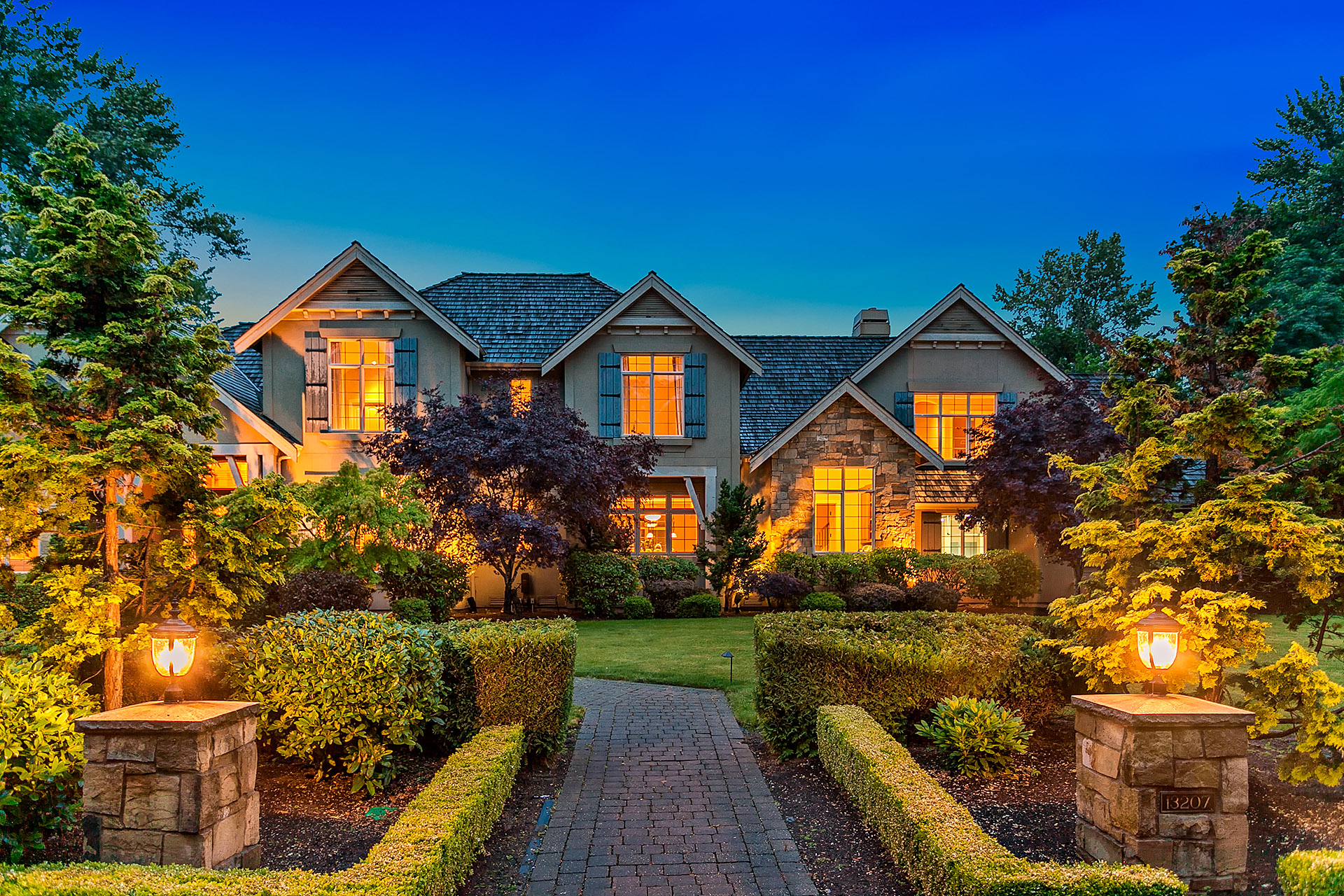
    One of the most useful editing tricks is to blend ambient photos with flash photos. This can be most effective for interior photos. Often, you do not capture the perfect image just with your camera. The lights can be off and you have a variety of light source that makes the image look crazy. To combat this problem, most real estate photographers take multiple photos of the same subject in different lighting settings. Then, you merge the photos in order to get the best lighting in the image.
    Blending ambient and flash photos

    Blending Ambient and Flash

    Blending different photos in order to create one seamless image with amazing lighting can be tricky but doable. If you need to blend ambient and flash photos into a single photo, follow these steps:

    1. Open all of your images. Make sure that you have opened all the ambient and flash photos in your Photoshop. You might have photos of the lighting fixtures inside on and another photo with the lighting fixtures off. Arrange the photos and make the ambient photo your base layer for blending.

    2. Edit your lights-on photo first. Before you start blending, make appropriate corrections for each the photo. On your lights-on photo, switch the blending mode to lighten. If you have visible lighting fixtures, you might want to brush in the lights. Put a black layer mask. Click on the brush tool and set the flow to 30 percent. Brush the area where the lights are. Make sure that the lights are already visible.

    3. Correct your lights-off image. Retouch your lights-off layer by putting a black layer mask on top. With this, you want to tone down the bright areas of the image, like where the ambient lights are hitting and other sources of light.

    4. Use stamp visible. This is a very helpful function that creates a new layer of the content that you want to merge. Make sure that you make all your working layers visible. Then, go to Layers menu and click Merge Visible while holding the Alt key.

    5. Align your verticals. Make sure that you have straight lines on your image. The problem with shooting interiors is that you get slanted lines all over. First, you can try to use the Lens Correction function under the Filter menu to see if Photoshop can automatically straighten the lines. Photoshop usually matches the camera and lens used to create the image and automatically corrects the minimal distortion. You can also use the Skew function under Transform. This allows you to align your verticals manually. Just pull the corner until your verticals line up with your guide.

    6. Remove unwanted objects. If there objects in your frame that you want to remove, like some light stands that are in the frame, make a new layer. Click the Spot Healing Brush tool and go over the areas that you want to remove.
    Crop the photo as needed. Make sure that you don’t include unnecessary parts in the photo. Click on the Crop tool. Crop the image as needed in order to bring the focus into the interiors. This also removes unnecessary areas in the photo.

    7. Flatten the image. Once you are happy with how the photo looks like, make sure that you flatten the layers to create one image. This would be your deliverable to the client. To flatten, make sure that the layers you want to retain are all visible. Then, go to the Layer menu and click Flatten Image. Now, you have a single photo that has all the edits that you’ve done.

    There are still a lot of other Photoshop tricks and edits that you need to be familiar with as a real estate photographer. Just like being in photography, everything takes practice. Make sure that you train your eye and keep shooting. Find angles that will work for the specific space andproperty. Editing in Photoshop is time-consuming. Once you are used to it, you can easily find a flow that works for you.

  • Interior Photos: Basic Editing Using Lightroom

    Interior Photos: Basic Editing Using Lightroom

    Interior photos are beautiful but also can be very challenging to shoot and edit. However, they make up the majority of the photos in a given property listing since buyers are interested in what’s inside a home.


    interior editing using lightroom 1
    Photo Editing Company

    Aside from putting the work in shooting the property, you also need to take the time to retouch and post-process your images before you hand them over to the clients. Amazing photos take time and effort, especially if you are shooting interior photos.

    Using Lightroom

    adobe lightroom logo - phixer

    Adobe Lightroom is a staple tool for many photographers, no matter what their niche is. This software allows organizing, viewing, and editing a large number of images. This is great for non-destructive editing that still keeps the data of the original image.

    Lightroom will allow you to batch edit and adjust the lighting and colors on your images. This is a great quick tool to go over images for some minor or basic editing.


    Aligning your verticals

    Aligning verticals lightroom
    photo by Shopify

    One of the most basic, yet most necessary editing that needs to be done on all interior photos is aligning the verticals. This can be easily done on Lightroom.

    1. Use transform tool under the develop tab and make the proper adjustments.
    2. Make sure that the columns and the edges of the furniture are straight and aligned properly.


    Adjusting the brightness

    One of the usual issues when shooting interiors is dark images. There is an easy fix to this problem.

    brightness adjustment lightroom

    1. Open up the shadows in your image a little bit by dragging the shadows to the right. Adjust accordingly and make sure that you don’t highlight all your photo. A middle ground would be perfect.
    2. If needed, you might want to bring down your highlight a little bit. This does not work for all interior images unless you see some hot spots or there are a lot of bright lights in your photo.
    3. Hold down the Alt key on your PC or the option key on your Mac, and bring the whites bar to the right until you see specs of white on your photo. This will define the white on your image.
    4. To show the blacks on your image, hold down the Alt key on your PC or the option key on your Mac. Bring the blacks bar to the right until you see some specs of black color on your image.


    Correcting the white balance

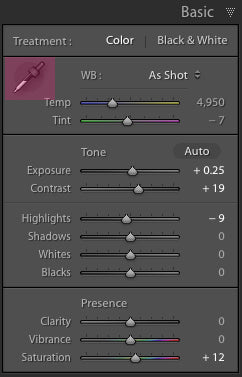
    Changing the white balance on interior photos can be a matter of personal taste. Often, the white balance in interiors can be off since you have several light sources. One of the easiest ways to correct the white balance is to use the eyedropper tool.

    eye dropper tool lightroom
    photo by www.lightroompresets.com

    1. Click on the eyedropper tool on your Lightroom and find a neutral color. You can check the RGB percentages on the tool as you go over some areas of the photo. It would be best to pick white or a gray area.
    2. Once you click on the right color, this will automatically correct the white balance on your image.
    3. Adjust the temperature and the tint as to your liking. Increase the temperature a bit if the photo is too blue and bring the tint to the right.
    4. Add some contrast and bring in some exposure to the photo. Just adjust the contrast and exposure bar as you seem fit.


    Adjusting for the grain

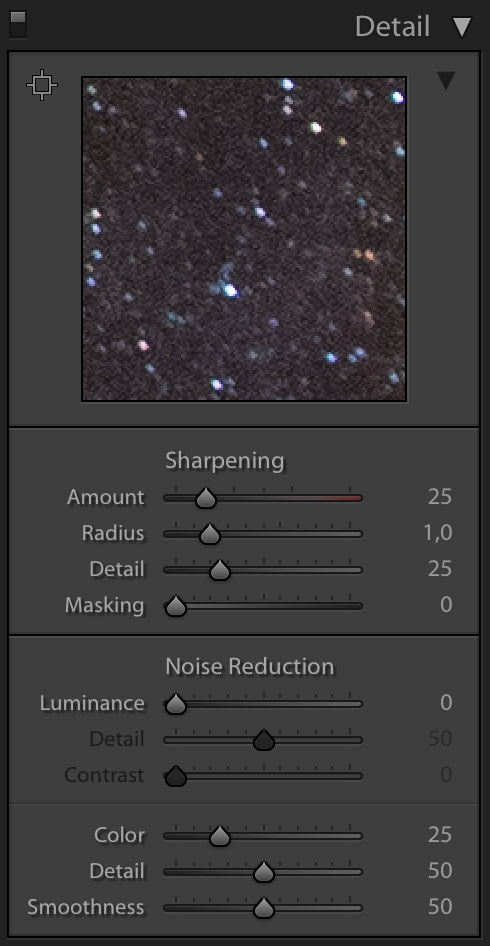
    Check the darkest areas of your image, like the floor or corners. Often these are the parts that have the most grain. To retouch for the grains, follow these steps:

    Luminance noise reduction lightroom
    photo by photographingspace.com

    1. Adjust the luminance under the noise reduction module. Drag the bar to 40 or until the green grain gets neutralized.
    2. Adjust the amount of sharpening to around 90 to make the photo very sharp.


    Doing some lens correction

    Lightroom Lens Corrections
    photo by photographylife.com

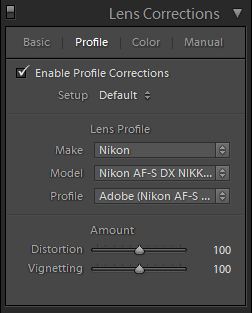
    Lightroom’s lens correction tool is a very handy module that corrects the different optical issues on most lenses. It’s a quick and powerful tool that can be used on photos.

    1. Just go to the lens correction module and check enable profile corrections. This automatically adjusts your photos and can bring about such big difference in the after photo.
    2. Go to the color tab under lens correction and check remove color aberration.


    Dodging and burning

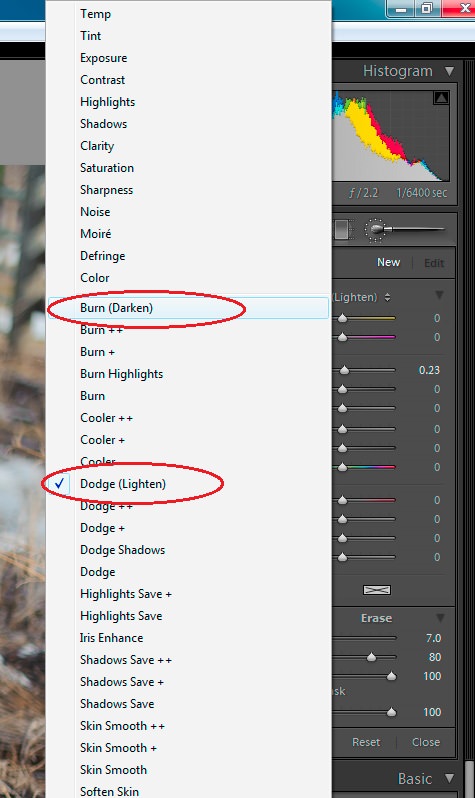
    Adding some interesting lights on the image is possible through Lightroom. Doing some dodging and burning on the photo will add some extra light. This can be great for images with lighting fixtures as this creates more realistic lighting.

    dodge and burn lightroom
    photo by photographylife.com

    1. Take your brush tool and make sure that you adjust the exposure, feather, flow, and density. Keep these high in order to create effective streaks of light.
    2. Drag the brush on the areas where the light beams from the fixtures are naturally hitting, like the floor or ceiling. Drag over these areas to brighten the area. This technique adds some shine on the light in the room.
    3. You can create a new brush with every beam that you add to make the light beams different every time.

  • Simple Guide to Enhance Real Estate Photography Using Photoshop

    Simple Guide to Enhance Real Estate Photography Using Photoshop

    As a real estate photographer, there is a lot that goes on a day of photo shoot. Finding the right time of the day, good lighting, and good angle are all necessary to create great photos. In addition to that, the right gears are also important. However, most of the work goes beyond the shoot. Real estate photography editing and retouching take a lot of time to enhance real estate photography.

    Retouching skills are necessary in order to beautify and create amazing photos that make potential buyers interested in the property.

    Here are some tips for using Photoshop to enhance real estate photography:

    Using Hue and Saturation

    hue and saturation

    Hue and Saturation is a great Photoshop tool to correct colors. It has different options that you can play around with. One of the typical color errors in real estate photography has to do with adjusting the greens. Capturing the vibrant exteriors, like the grass and trees can be challenging for newbies. To accentuate the greenery follow these steps:

    1. Open your image in Photoshop and select Image menu. Choose Adjustments and click on Hue and Saturation.
    2. Select Yellow from the drop-down menu on the dialog window.
    3. You can adjust the Hue to +15, drag down the Saturation to -5, and the Lightness to -5.
    4. Select Green from the drop-down menu and make the same adjustments to Hue, Saturation, and Lightness.
    5. Click OK.

    With this technique, the changes are usually subtle. However, you’ll notice more vibrancy in the grass and make it stand out more in the photo.

    Adjusting the brightness

    Adjusting the brightness

    When shooting exteriors of properties, getting a balanced light can be a challenge especially if you’re working with direct sunlight. There will be dark and shaded areas and brighter areas. Editing the photo in Photoshop might be the best solution for this issue.

    1. Go to the Image menu. Then, choose Adjustments and Click on Levels.
    2. Drag the center bar to the right in order to tone down the super bright areas.
    3. Click OK.

    This will add more contrast to the image. This tones down a lot of the brightness in the photo.

    Darkening the grass color

    Darkening the grass color

    If you see the grass a bit brighter than it should be, do a little retouching.

    1. Go to the Toolbar and right click on Burn tool.
    2. Select the right size of your brush. Go for a larger brush if you’re working on a larger area and a smaller brush for some details. Drag over your brush to the grass. This darkens some of the grass and leaves.
    3. Stop only when you get the contrast that you want.

    Straightening the home or property

    Straightening the home or property

    Having straight lines on your image is important to make the property look its best. Often when the camera is not angled correctly, you might have slanting lines. To correct this, follow these steps:

    1. Click on the Rectangular Marquee tool from the Toolbar.
    2. Select the entire image.
    3. Click on the Edit menu and choose Transform.
    4. Click the Skew option from the drop-down menu.
    5. Drag the corner of the photo to the left, if the house or property is leaning to the right. You might also need to pull the right corner a bit to balance it out. Make sure that you do not pull too far as this goes way past realistic. Make sure that the edges are aligned and are straight.
    6. Once you’re done click on the check button.

    This technique also works in straightening up the edges for interior shots.

    Evening out the lighting in the interior

    Evening out the lighting in the interior

    For interior shots, there might be instances when either half of the photo is darker than the other half. Lighting up every corner of the interior can be a challenge.

    1. Go to the Dodge tool and choose the right size of the brush to work with.
    2. Drag the Dodge tool over the darker areas to add a bit of brightness.
    3. Go to the Filter menu, choose Sharpen, and click on Unsharpen Mask.
    4. Raise the amount in order to get clearer details. Click OK.

  • How HDR and Flash work together

    How HDR and Flash work together

    Which Is Better for Real Estate Photos?

    There are strong opinions in the photography community about the usefulness of HDR vs Flash photography. Before we get into that debate lets take some time to define HDR. An HDR image is commonly made by taking three photos of the same scene, each at different shutter speeds. The result is a bright, medium, and dark photo, based on the amount of light that got through the lens. A software process then combines all the photos to bring details to the shadows and highlights both. High dynamic range processing includes any photo in which you are extending the luminance values beyond what the camera initially captured. The great Ansel Adam’s used the Zone System to extend the dynamic range of his photos. You are also extending the dynamic range of your photos by pushing up shadow detail and bringing down highlight detail through luminosity masking, exposure blending, curves, levels, or pumping sliders in camera raw.

    by Diana Eftaiha

    HDR, or “High Dynamic Range” photography receives a lot of negativity on the internet, particularly from photographers who prefer the use of traditional flash or ambient lighting techniques. So why does “HDR” elicit so much disapproval? There’s a lot of hate because HDR photos sometimes don’t look realistic but when trying to capture the perfect sunset over an ocean it would be impossible to get the detail in the foreground, while also bringing out the colors of the sky without the use of HDR. Good HDR is about finding a proper balance and requires some forethought and patience to avoid the over-saturated or washed out and flat looking photo that induces cringes from your fellow photographers. The goal is that when you look at an HDR photo you can see exactly what you would see were you to be standing there looking at the subject with your own two eyes. HDR is a process, not a genre. It’s another tool in your bag of tricks that you can use to create art and sell images. Instead of writing off high dynamic range techniques, take photos knowing that you can use HDR as a tool when it’s appropriate for the subject. There are some subjects that naturally lend themselves to HDR, and others that don’t. If you are shooting anything that has texture and depth (especially metal), then HDR can look great.

    Photo by Alberto Restifo on Unsplash

    Flash photography refers to the technique in which a flashbulb or electronic flash is used to provide momentary illumination of a dark or insufficiently lit subject. Flash photography has been around for more than a hundred years. It started with a dangerous and manually controlled technology that used a powder that was lit by either fire or electrical current. Why use flash when you are already shooting brackets? Well, the ability to control contrast and brightness will almost always produce better photography. Contrast refers to the difference in brightness between the darkest and lightest portions of the photo. The distribution of the light source is the primary determinant of the overall contrast. Even though artificial light sources offer you more control over photo shoots, it is associated with the burdens of needing more gear, and time to set it all up. Depending on the photo you have in mind, you may need multiple artificial light sources to balance your image out. Also, with flash photography, if the dynamic range of a scene is greater than one to be captured with only one shot, you have the choice to sacrifice either the highlights or the shadows of a photograph.

    Photo by Jakob Owens on Unsplash

    Taking multiple exposures, with one good flash shot can make things a lot easier in post-production.


    Photo by Phixer 

    As evidenced by the image above, the strengths of these two techniques complement each other well and therefore the results possible after post-production are exceptional.

  • Outsource Real Estate Photo Editing Services: Step-by-Step Guide

    Outsource Real Estate Photo Editing Services: Step-by-Step Guide

    As a real estate business or a photographer, outsourcing can be your best friend. This is the reality in a highly competitive real estate industry where every minute is of the essence. You have to make the most of your time and do the most important tasks first. You have to put a monetary value on your time so you know if it’s worth spending hours on time-consuming tasks such as photo editing.

    If you are considering outsourcing your real estate photos, there are certain steps that you need to follow in order to find a company that delivers your needs.

    1. Identify your goals. First, you need to figure out what you want to accomplish with your photos. Are you going to use these for sales? Will these go in your portfolio? Are these for a broker? These questions will help you in assessing how your edited real estate photos should look. In addition to that, you need to know the output that your client needs.

    2. Know the scope of work. Once you know your goals, you have to identify the work that needs to be done. You can be specific about what changes you want to be done or instead give more general direction on the feel and look of the images after the post-processing. This will allow you to relay to your photo editor the specifics of how you want the images to be and so they have a clear vision of what they need to work on.

    3. Work with your budget. Find out how much you are able to spend on your photo editing. This can help in finding a company who can do the work while still keeping within your spending limits. It is best to figure out the usual rates for this type of work, especially if you have no idea how much it costs. Ask peers and get quotes from different professional photo editing companies. This helps you in setting the right budget without skimping on the quality.

    4. Ask for their portfolio and a possible sample. Once you have a budget, ask for quotes and for the post-production company’s portfolio first. This is essential before you make your choice. This will help you in narrowing down your options so that you may find one that has the best output for the price that you’re able to afford. You also need to ask if they could do a sample retouching. Send them two or three of your images so you can see the quality of their work. Make sure that you specify the changes and the look that you want and at the right time.

    5. Narrow down your choices for a photo editing company. Research and look for the best photo editing companies that specialize in real estate. You can also ask for recommendations from peers. However, keep your list to a minimum if possible in order to prevent choice fatigue. With the portfolios in hand, you will be able to decipher which companies can help you retouch your images in order to achieve your goals. Check their policies and their turnaround time. Next, make sure that you pick your top five companies.

    6.Choose the best one for your needs. From your list, pick one that fits your budget and needs. Make sure that they provide you with quality work and fast turnaround time so you can meet client deadlines. Look into their policies and set a working timeline for your images. Go for a company with great support so you are able to communicate with them in case of any urgent requirements.

  • How Photo Editing Helps Real Estate Business

    How Photo Editing Helps Real Estate Business

    The real estate world is a hectic industry. It’s cutthroat and highly competitive. From representing the best properties to making a successful sale in a matter of hours, every task is of high importance. You need to be constantly moving forward in order to reach your quota or get ahead of your competition.

    Because there are a lot of tasks involved in keeping your business afloat and ahead, you need to be smart in managing and delegating the tasks. One of the best decisions that a real estate photographer can make for their business is to outsource real estate photo editing.

    Here are the reasons why photo editing can help your business:

    • Helps businesses focus on the important things.

    As a business owner, there are a million things that you have to do in order to keep your business alive. Instead of spending your time on the most time-consuming task, you need to know how to delegate so that you can focus on the important things that help bring the money in. Once you outsource photo editing to the professionals, you can focus on booking the next shoot or finding the next property. You remove the tasks from your to-do list that are not your strengths so that you may find the time for the tasks that build your business and improves your bottom-line.

    • Increases sales.

    Since you’re leaving photo editing to the professional editors, this helps in boosting your sales. You can book more clients without having to worry about spending your time in editing and retouching your work. Having professionals work on your photos, you are able to get high-quality images that will help in selling the property quickly. Often, home buyers base their decisions on the images that they see online. Making sure that you have great photos to represent the property helps in enticing more prospects which in turn helps increase your referrals and re-orders.

    • Frees up time.

    Time is the most valuable commodity for your business. You need to spend more time making your operations more efficient and increasing your client list. When you delegate tasks and outsource the photo editing, you save yourself from the tedious task of going through every single photo. Instead, you have precious time to do what you do best. Having that extra time will allow you spend time on your personal interests as well. A successful personal life is necessary to maintain your sanity and actually increases the odds of having a successful business.

    • Builds up your brand.

    Great photos of properties can make your brand look credible. Once your photos are edited by professionals and you have a specific style, you can slowly build a specific kind of branding to your photos. This signature look can build up your branding and help in improving how your business will look like to potential customers. People will tend to have a better perception of your company.

    • Adjust photos for high conversion.

    Although photographers do their best in making sure that they take the right photos with the right angle and lighting to project the property in the best light, editing is still mandatory in order to make the images even better. By letting the professionals do the photo editing, you deliver amazing and high-quality photos that increase sales. You are convincing potential clients that you have the best product and you are able to help sell properties faster.

    • Keeps you on top of the competition.

    Once you have the best photo editors under working with your company, you are then able to keep up with competitors. The best images coupled with fast turn times will help you stay ahead in the real estate game. You can keep up with the best and earn the top spot in your market.